
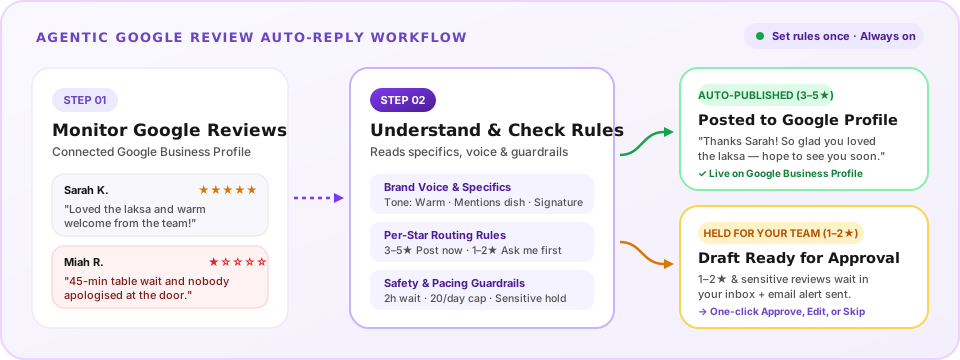
Published automatically in your brand voice
- 3★, 4★ and 5★ routine reviews, personalised to what the customer wrote
- A 1★ or 2★ review that is all praise (often a wrong tap) gets a thank-you
ReviewLens monitors your Google reviews, understands customer feedback, and automatically publishes personalised responses in your brand voice. Set your rules once, automate routine replies, and let your team focus on the reviews that need human attention.
From $9.99/location/mo on Reply Autopilot · Also included in Starter ($49/mo) & Pro ($149/mo) · Independent tool, not affiliated with Google.
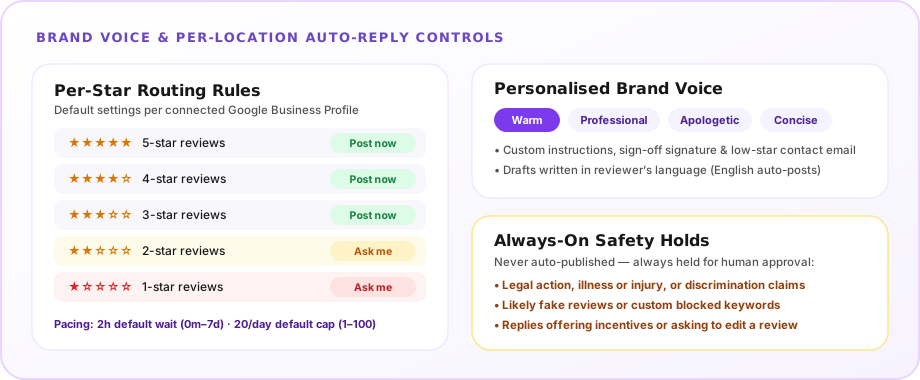
Each star rating is set to “Post now” or “Ask me”. These are the out-of-the-box defaults, and you can customise any of them per location.
Every held review arrives with a tailored draft already written and an email notification, so responding takes one click. If you prefer, an “Ask me” draft can publish automatically after 3 days — while reviews held for safety never publish by themselves.
Sign in with the Google account that owns or manages your Business Profile. Publishing replies directly to Google requires this owner/manager connection (locations added via Maps link can upgrade in one step).
Choose which star ratings publish automatically, set your reply delay and daily limit, pick your tone and signature, and switch auto-reply on for the location.
ReviewLens monitors incoming reviews and publishes personalised responses within your rules. Anything requiring human judgement waits in your inbox with a draft ready.
The Reply Autopilot plan gives you the ReviewLens inbox and agentic AI auto-reply for connected Google Business Profiles, priced per location:
Start with a 7-day free trial. Your card is taken at checkout and charged when the trial ends; cancel before then and you pay nothing. Agentic AI auto-reply is also included in the Starter ($49/mo) and Pro ($149/mo) plans alongside recurring-theme analytics, Ask Olive, and competitor tracking.
ReviewLens monitors your connected Google Business Profile, understands each customer’s feedback, and automatically publishes personalised responses in your brand voice. By default, 3, 4, and 5-star routine reviews are answered automatically, while 1 and 2-star reviews and sensitive ones wait in your inbox with a draft ready so your team can focus on reviews that need human attention.
ReviewLens reads the specific details in each customer review rather than pasting canned templates. You choose a tone preset (professional, warm, apologetic, or concise), add your own brand-voice instructions, set a sign-off signature, and optionally include a contact email for low-star reviews.
You choose per star rating: each one is set to "Post now" or "Ask me". Out of the box, 3 to 5 stars post on their own and 1 and 2 stars ask you first (a 1 or 2-star review that is all praise, often a wrong tap, still receives a thank-you). Whatever you choose, a review that mentions legal action, illness or injury, or discrimination waits for you, as does one that looks fake or contains words you listed.
Yes. Any star rating set to "Ask me" gets a draft you can approve, edit and send, or skip. Replies that post on their own wait 2 hours after the review reaches ReviewLens by default, giving you time to step in first, and you can set that wait anywhere from 0 minutes to 7 days.
Up to 20 automatic replies per location per day by default. You can set any daily limit from 1 to 100. Replies over your daily limit post the next day.
Replies are written in the reviewer’s language. For now only replies in English post on their own; a reply written in another language waits for your approval in ReviewLens, ready to send in one click.
Only if you turn that on. By default auto-reply answers reviews written after you turn it on. Switch on "Also answer my older unanswered reviews" and, from your second paid month, it works through older unanswered reviews too: up to 20 a day per location, newest first, after the day’s new reviews and within your daily limit, under the same rules. Either way, from your second paid month older unanswered reviews get a draft ready, up to 20 a day per location.
The Reply Autopilot plan is $9.99 per location a month for 1 to 5 locations, $7.99 each for locations 6 to 20, and $5.99 each from location 21, with a 7-day free trial. Automatic replies are also included in the Starter ($49/mo for 1 location) and Pro ($149/mo for up to 5 locations) plans alongside full AI review analytics.
No. ReviewLens is an independent tool and is not affiliated with, endorsed by, or sponsored by Google. It publishes replies only to Google Business Profiles you connect as their owner or manager. Google and Google Business Profile are trademarks of Google LLC.
Connect your Google Business Profile, set your rules once, and let ReviewLens publish personalised responses automatically while your team focuses on the reviews that need human attention.